
MeetWave
MeetWave is a privacy-first AI meeting recorder for macOS, Windows, Linux and ChromeOS that records Zoom, Teams, and Google Meet without a bot, then transcribes
MeetWave is a privacy-first AI meeting recorder for macOS, Windows, Linux and ChromeOS that records Zoom, Teams, and Google Meet without a bot, then transcribes
About this launch
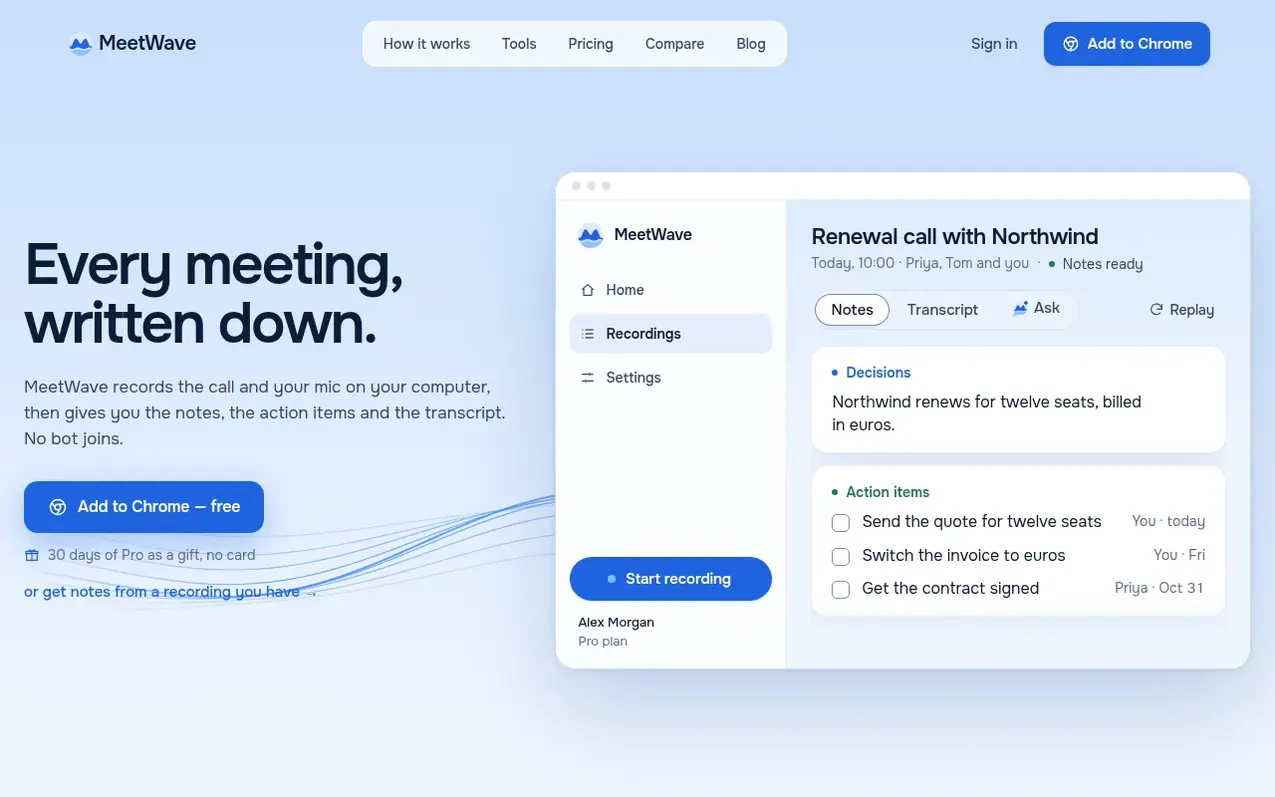
MeetWave records your meeting audio and microphone on your own computer through a Chrome extension for web calls or a Windows desktop app for any application. It transcribes the call, creates a summary with decisions and action items, and stores everything encrypted in your account. The product works with Zoom, Microsoft Teams, Google Meet, Webex, Slack huddles, Discord and other apps. Notes are tailored to the meeting type—such as sales briefs, interview scorecards, or decision records. MeetWave does not join calls as a participant, does not use your meetings to train AI models, and lets you choose when to record.
What it does
- Records Zoom, Teams, Google Meet, and other apps without a bot joining the call
- Role-based meeting templates for notes
- Action items tracking with owners
- Full transcript searchable and exportable
- Calendar and Slack integration
- 15+ AI insight types from conversations
Pricing
Pricing model: Freemium
Free: 10 hours of meetings a month, 25 notes a month, with basic features. Pro: $16/month or $11/month billed annually ($132/year), includes 40 hours of meetings a month, unlimited notes, full transcripts, and access to calendar and Slack integration. Pro+: $32/month or $26/month billed annually ($3
Shopper questions
Does a bot join my calls?
No. MeetWave records the call audio on your computer. Nothing joins the meeting and nothing appears in the participant list. The Chrome extension can post a recording notice in the meeting chat if you enable it.
Which meeting apps does it work with?
On Windows, the desktop app works with any app that plays sound, including Zoom, Teams, Google Meet, Webex, Slack huddles, and Discord. The Chrome extension records Zoom, Teams, and Google Meet calls in the browser.
Where does MeetWave store my recordings?
Recordings are stored encrypted in your MeetWave account at app.meetwave.io. The Chrome extension uploads the finished recording; the Windows app saves recordings locally and uploads them for transcription. Your meetings are never used to train AI models.
What is included in the 30 days of Pro?
Every new account receives 30 days of Pro automatically as a gift when you sign up, with no credit card required. When it ends, you return to the Free plan and nothing is charged. You can choose to keep Pro if you want to.
Is there a money-back guarantee?
Yes. Every Pro and Pro+ subscription has a 30-day money-back guarantee. Email admin@meetwave.io within 30 days of your first payment (or of an annual renewal) and you receive a full refund with no reason needed.
MeetWave has a free listing. The owner can unlock the full profile with a paid launch for $5:
- Founder story (locked)
- Milestones (locked)
- Demo video (locked)
- Dofollow website link (locked)
Shoppers also viewed
- TokScript
Audio, Voice & Podcasting
- Relayo
Audio, Voice & Podcasting
- hearlog
Audio, Voice & Podcasting
- Audionarrator
Audio, Voice & Podcasting