ScribeTo
Convert video and audio to editable text with speaker labels, timestamps, and exports in 99+ languages
Online tool to transcribe video, audio, and live speech into editable text with speaker labels, timestamps, summaries, translations and multiple export formats.
About this launch
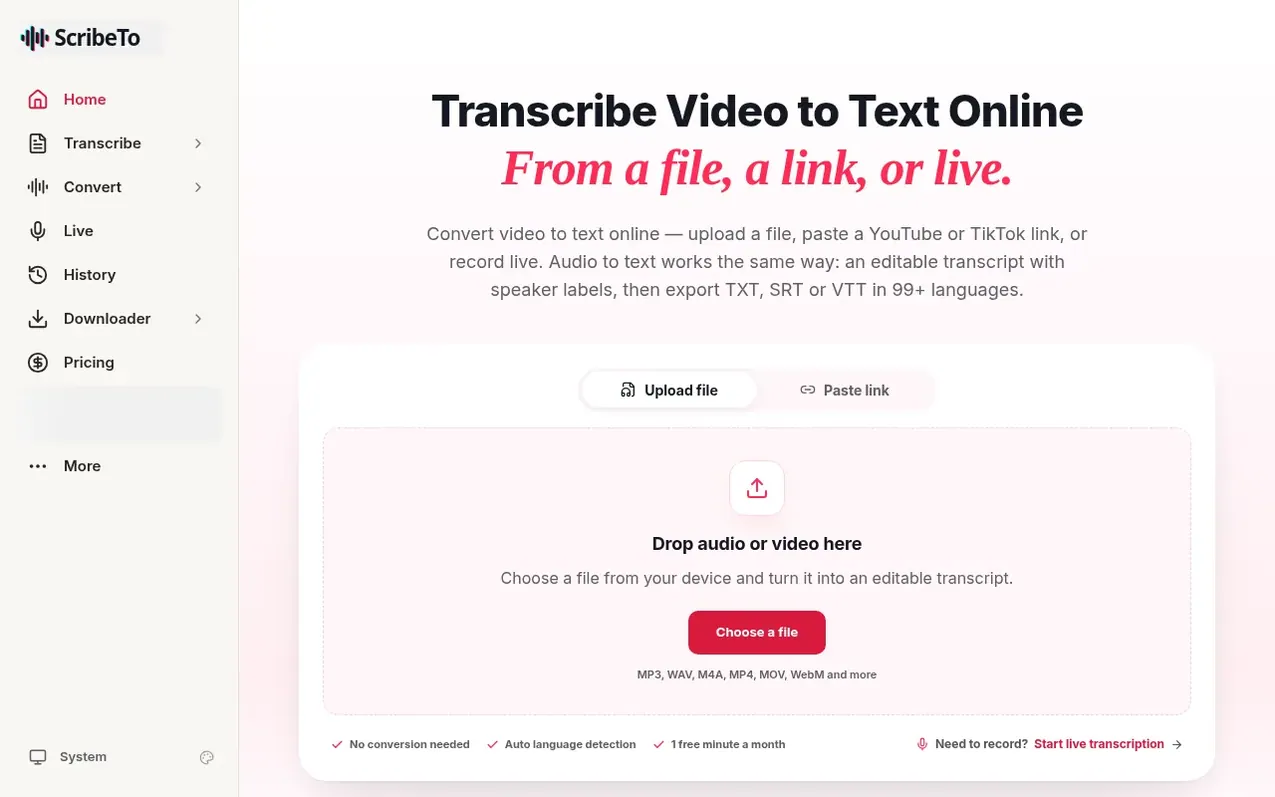
ScribeTo is a web-based workspace that converts audio files, video files, public media links, and live speech into editable, searchable, translatable transcripts. Users can upload files in formats like MP3, WAV, M4A, MP4, MOV and WebM; paste public URLs from platforms including YouTube, TikTok, Instagram, Spotify and Apple Podcasts; or record live in the browser. The platform automatically separates speakers and adds timestamps to transcribed segments.
Once transcribed, users can edit the transcript in place alongside the audio, rename speakers, adjust caption timing, and generate AI-powered summaries, outlines, action items and translations. Transcripts can be exported in multiple formats including TXT, Markdown, SRT, VTT, and JSON. All generated material remains connected to the original audio so corrections to the transcript automatically update associated summaries and translations.
The product is designed for creators, students, researchers, podcasters, interviewers and educators who need to reuse spoken content. Features include support for 99+ languages, automatic language detection, clickable timestamps, mixed-language transcription, and media stored in Cloudflare R2 with encryption and access controls. Users can search recordings, build searchable interview archives, extract quotes with timestamps, and generate captions for video clips.
What it does
- Upload video and audio files in multiple formats (MP3, WAV, M4A, MP4, MOV, WebM)
- Paste public media links from YouTube, TikTok, Instagram, Spotify and other platforms
- Automatic speaker detection and labeling
- Edit transcripts in place alongside audio playback
- Export in multiple formats: TXT, Markdown, SRT, VTT, JSON
- AI-powered summaries, outlines, and Q&A
- Translate transcripts into 99+ languages
- Automatic language detection
- Media stored in Cloudflare R2 with access controls and encryption
Shopper questions
How accurate is video to text transcription?
Clean speech in a quiet room comes back close to publishable. Heavy accents, crosstalk and background noise reduce accuracy. ScribeTo keeps every transcript editable beside the audio so users can verify passages that matter.
What media formats and sources does ScribeTo support?
Users can upload MP3, WAV, M4A, MP4, MOV or WebM files; paste public URLs from TikTok, Instagram, YouTube, X, Facebook, Spotify, Apple Podcasts and RSS podcast feeds; or record live in the browser.
What export formats are available?
ScribeTo exports transcripts as TXT, Markdown, SRT, VTT, and JSON. Subtitles are exported as SRT or VTT with timing that users approve. There is no DOCX or PDF export.
Do AI features use my edits or the original transcription?
AI actions including summaries, outlines and answers read the corrected transcript. Fixing a name or term once ensures every summary and answer uses the corrected version.
Who can access my recordings and transcripts?
Files and transcripts belong to the account that created them. Media is stored in Cloudflare R2. Only the data needed to complete a task is passed to speech providers; details are in the Privacy Policy.
ScribeTo has a free listing. The owner can unlock the full profile with a paid launch for $5:
- Founder story (locked)
- Milestones (locked)
- Demo video (locked)
- Dofollow website link: not on this free listing (its website link is nofollow)
Shoppers also viewed
- HushBook
Audio, Voice & Podcasting
- FluidCast
Audio, Voice & Podcasting
- MP3 to Text
Audio, Voice & Podcasting
- PodText
Audio, Voice & Podcasting