
Writer Studio
Desktop software for writing and organizing novels, with manuscript structure, character wiki, and export to multiple formats
Desktop app for fiction writers to organize manuscripts into scenes, maintain a character and location wiki, track revisions, and export to DOCX, EPUB, and FB2.
About this launch
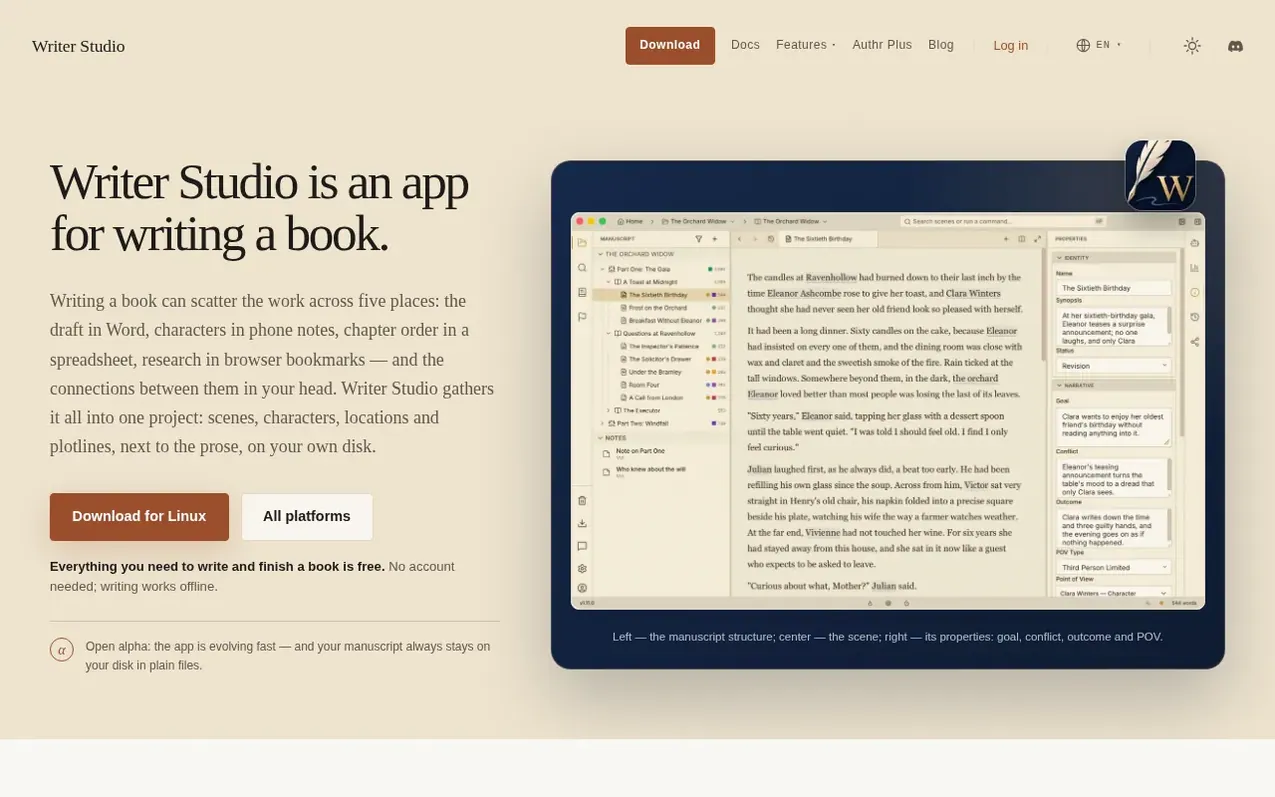
Writer Studio is a desktop application designed for fiction writers to manage complete book projects on their own computer. The app organizes manuscripts into scenes, which can be optionally grouped into chapters and parts, and provides a unified Book Wiki for tracking characters, locations, and other story elements. All project files are stored locally as plain Markdown and JSON, with no cloud requirement for writing.
The application includes built-in proofreading for Russian and English, version history with per-scene comparisons, and local backups. Writers can export their work to DOCX, EPUB, FB2, PDF, and Markdown formats. An optional AI assistant is available, controlled by the writer's own API key or through Authr AI subscription, with all changes requiring explicit approval before being applied to the manuscript.
Writer Studio is available for macOS, Windows, and Linux, with the core writing features provided free. An optional Authr Plus subscription adds cloud backup and managed AI access. The app includes additional tools such as beta reader sharing, story structure templates, writing goal tracking, and the ability to import Word documents with automatic chapter and scene detection.
What it does
- Scene-based manuscript structure with optional chapters and parts
- Version history with per-scene comparisons and Trash recovery
- Export to DOCX, EPUB, FB2, PDF and Markdown formats
- Offline grammar checker for Russian and English
- Optional AI assistant with user-controlled approval
- Full-text search with regex support across manuscript and wiki
- Corkboard and plot grid for visualization
- Beta reader sharing with comments and analytics
Pricing
Free core features including writing, structure, Book Wiki, proofreading, export, local backups, and version history. Authr Plus subscription adds cloud backup and Authr AI with monthly budget plans.
Shopper questions
What happens if I stop using Writer Studio or my subscription lapses?
Your manuscript and local backups stay yours. If you have an Authr Plus subscription that lapses, the manuscript stays on your disk, local backups and version history remain yours, and previously uploaded cloud backups stay restorable. The app does not lock or encrypt your files.
Can I write with Writer Studio without using AI?
Yes, the book can be written with no AI at all. AI is an optional addition, not required for writing, structure, Book Wiki, proofreading, or export. Spellcheck and grammar checking work offline without any network or AI.
Can I import an existing Word document into Writer Studio?
Yes, you can import a Word document and Writer Studio will automatically detect and create real chapters and scenes, with a full preview before anything is created.
What formats can I export my novel to?
You can export to DOCX, EPUB, FB2, PDF, and Markdown formats, all with proper styling, front and back matter support.
Writer Studio has a free listing. Relaunches in the launch week of 23 November 2026. The owner can unlock the full profile with a paid launch for $5:
- Founder story (locked)
- Milestones (locked)
- Demo video (locked)
- Dofollow website link: not on this free listing yet (a top 3 finish in a launch week makes it dofollow)
Shoppers also viewed
- Wryte
Writing & Content
- PlotLens
Writing & Content
- NarrAItor
Writing & Content
- StoriesDen
Writing & Content