Stamp Creator Online
Design custom stamps online with editable text, logos and borders
An online stamp maker where you can design custom stamps by editing text, borders, shapes and logos in your browser, then download in multiple file formats.
About this launch
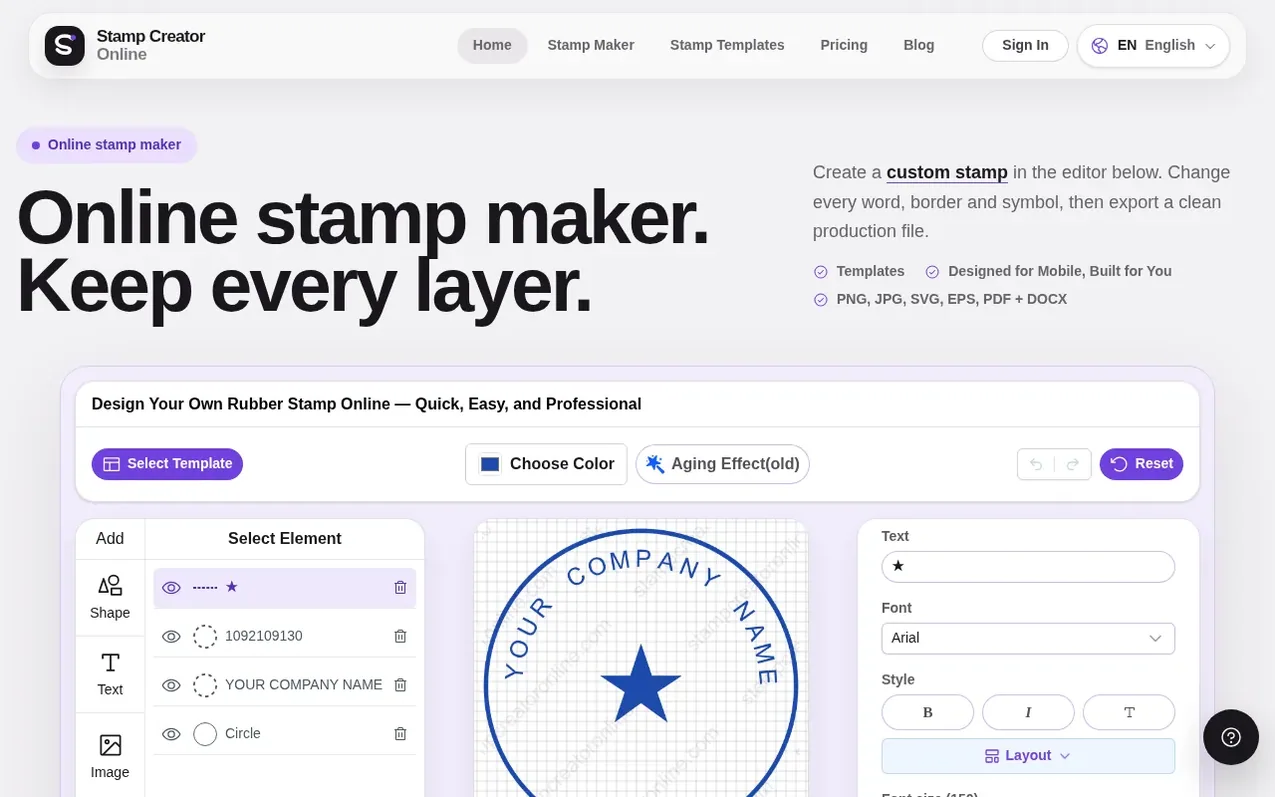
Stamp Creator Online is a browser-based stamp design tool that lets you create custom stamps for business seals, address labels, document marks and personal use. You choose a stamp shape (round, rectangle or triangle), add your own text and logos, and adjust colours, fonts and ink effects while previewing in real time. All design elements stay editable, so changing an address or name is a quick edit rather than a complete redraw. Designing and previewing are free; when your stamp is ready, you download the finished artwork in PNG, SVG, EPS, PDF, JPG or DOCX format depending on your needs. Files go straight from your browser to your device, and you can print them, share them with a manufacturer, or place them on documents.
What it does
- Editable text, borders and logos that stay separate during design
- Multiple stamp shapes including circle, rectangle and triangle
- Real-time preview while editing
- Logo and image upload support
- Ink effect and aging options
- Multiple export formats: PNG, SVG, EPS, PDF, JPG, DOCX
- Save and re-edit designs anytime in browser
- Customizable plate size in millimetres
- My Library for storing up to 50 designs free or 1,000 with paid plan
- Works on desktop, tablet and mobile browsers
Pricing
Pricing model: Freemium
One stamp: PNG $2.50, Vector package $2.90, Complete package $3.50. Monthly unlimited: $15.90/month or $9.90/month yearly at $119/year. Lifetime access: $299 one-time.
Shopper questions
What does it mean to make a stamp online?
It means building the stamp artwork in your browser by choosing a shape, replacing sample text, adding a logo if needed, and checking the preview. Designing is free; downloading the finished files is a separate purchase.
Is the stamp maker online free to use?
Designing, editing and previewing are completely free. You only pay when you download the finished file in your chosen format.
Can I add logos or custom images to my stamp?
Yes, you can upload a supported image from the design panel and adjust it as part of your stamp design. A simple one-color logo usually stays clearest at real stamp size.
What file formats can I download?
You can download your stamp in PNG, SVG, EPS, PDF, JPG or DOCX format depending on which package you choose. PNG works for documents and web use, while SVG and EPS are for manufacturers and designers.
Can I save my stamp design and edit it later?
Yes, every signed-in account can save up to 50 designs in My Library for free, or up to 1,000 designs with a paid plan. You can reopen and edit any saved design anytime.
Stamp Creator Online has a free listing. The owner can unlock the full profile with a paid launch for $5:
- Founder story (locked)
- Milestones (locked)
- Demo video (locked)
- Dofollow website link (locked)
Shoppers also viewed
- MyPaperKit
Design tools
- AI Kitchen Design
Design tools
- ideare
Design tools
- Matita
Design tools



