Pumpkin Stencil Maker
Turn your photo into a printable Halloween pumpkin carving stencil
Browser tool that converts photos into printable pumpkin carving stencils with cut, shave, and keep tones, processed entirely in your browser.
About this launch
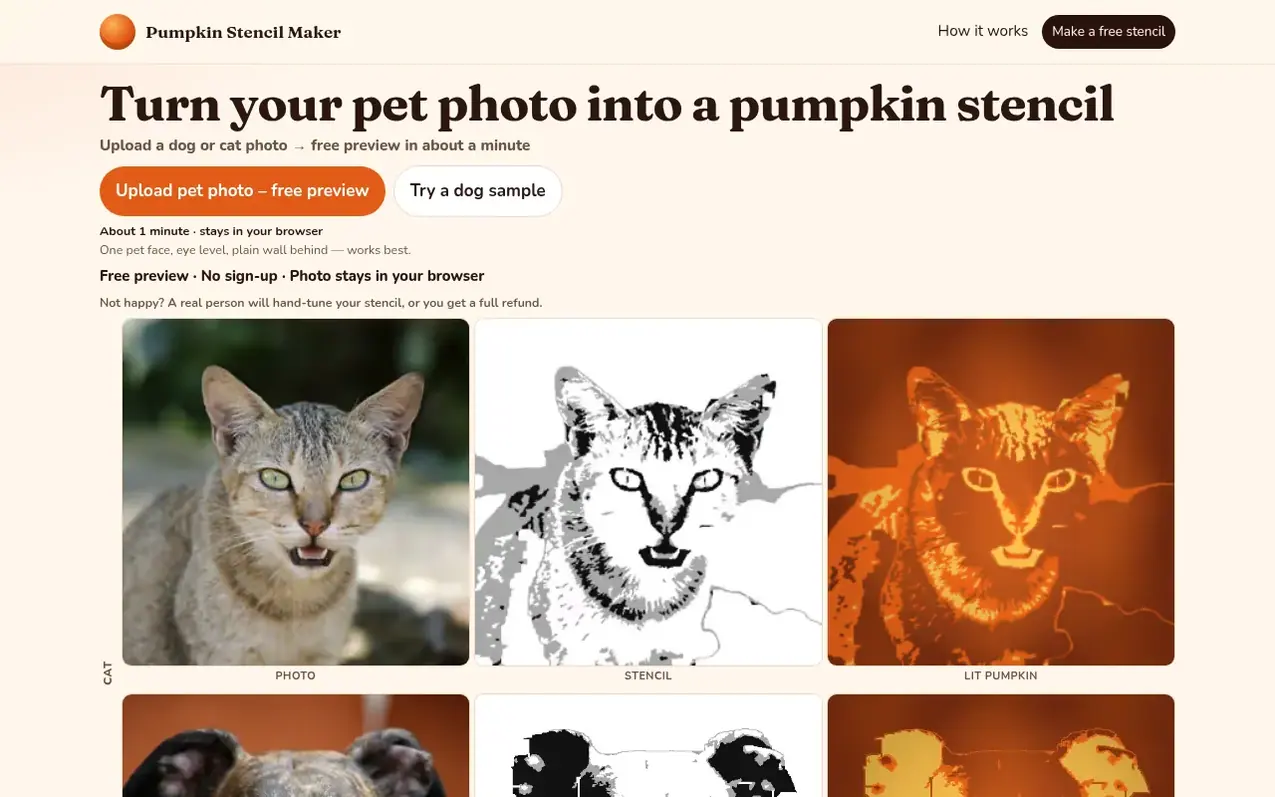
Pumpkin Stencil Maker is a web application that transforms a single photo into a printable pumpkin carving stencil in your browser. Upload a portrait, pet, or logo image facing the camera with a plain background, and the tool converts it into three tones: black areas are cut through, gray areas are shaved thin, and white areas remain as pumpkin skin. The tool automatically removes specks and bridges pieces to keep the stencil carving intact.
You can preview your stencil for free as a watermarked 1024-pixel PNG to check the likeness. For $4.99, the print pack includes a high-resolution 1500-pixel PNG without watermark and a PDF formatted for US Letter or A4 paper, scaled for 5, 7, or 9-inch carving faces. The PDF includes a legend explaining the cut, shave, and keep tones, plus carving instructions. All image processing happens on your device—photos are never uploaded to the server.
What it does
- Free watermarked preview to check likeness before purchasing
- Three-tone stencil system: cut (black), shave (gray), keep (white)
- Automatic bridge detection to keep pieces attached during carving
- High-resolution print pack with PNG and PDF formats
- Sized PDF for 5, 7, or 9-inch carving faces
- Works with portraits, pets, and logos
- Supports JPEG and PNG image uploads
- Image processing entirely in browser, no uploads
- Hand-tuning service with 24-hour turnaround or full refund
Pricing
Pricing model: Freemium
Free: 1024px test print with a footer watermark. Print pack $4.99: 1500px PNG with no watermark, plus a US Letter or A4 PDF for about a 5, 7, or 9 inch face.
Shopper questions
How do I transfer the stencil onto the pumpkin?
Print the page and tape it to the flattest side of a dry pumpkin. Poke every black edge and every gray edge with a push pin, nail, or toothpick, then peel the paper. A pounce wheel or carbon transfer paper works as an alternative transfer method.
What is the difference between shaving and cutting through?
Black is cut all the way through with a saw. Gray is shaved: scrape off the skin and a thin layer of flesh until a light inside the pumpkin shows through. White stays as full pumpkin skin.
What is the difference between the free PNG and the $4.99 print pack?
The free file is a 1024 by 1024 pixel PNG with a watermark footer. The print pack is a one-time $4.99 download that adds a 1500 by 1500 pixel PNG with no watermark and a PDF formatted for US Letter or A4, with a legend and carving steps.
What kind of photo should I start with?
Use one subject facing the camera with a plain wall or sheet behind it. JPEG and PNG both work. Hair, ears, and the outline of the head should sit fully inside the frame.
Can I use this with a Cricut?
No. The print pack is a PNG and a PDF for printing. It does not export SVG, so it is not compatible with a Cricut or other cutting machines. Print the page and carve the pumpkin by hand.
Pumpkin Stencil Maker has a free listing. The owner can unlock the full profile with a paid launch for $5:
- Founder story (locked)
- Milestones (locked)
- Demo video (locked)
- Dofollow website link (locked)
Shoppers also viewed
- MyPaperKit
Design tools
- AI Kitchen Design
Design tools
- ideare
Design tools
- Matita
Design tools



