LabelQueue
Batch barcode generator for Code 128, UPC-A, and Data Matrix with Avery label support
LabelQueue is a free, browser-based barcode generator that creates Code 128, UPC-A, and Data Matrix barcodes in bulk and merges them onto Avery label sheets
About this launch
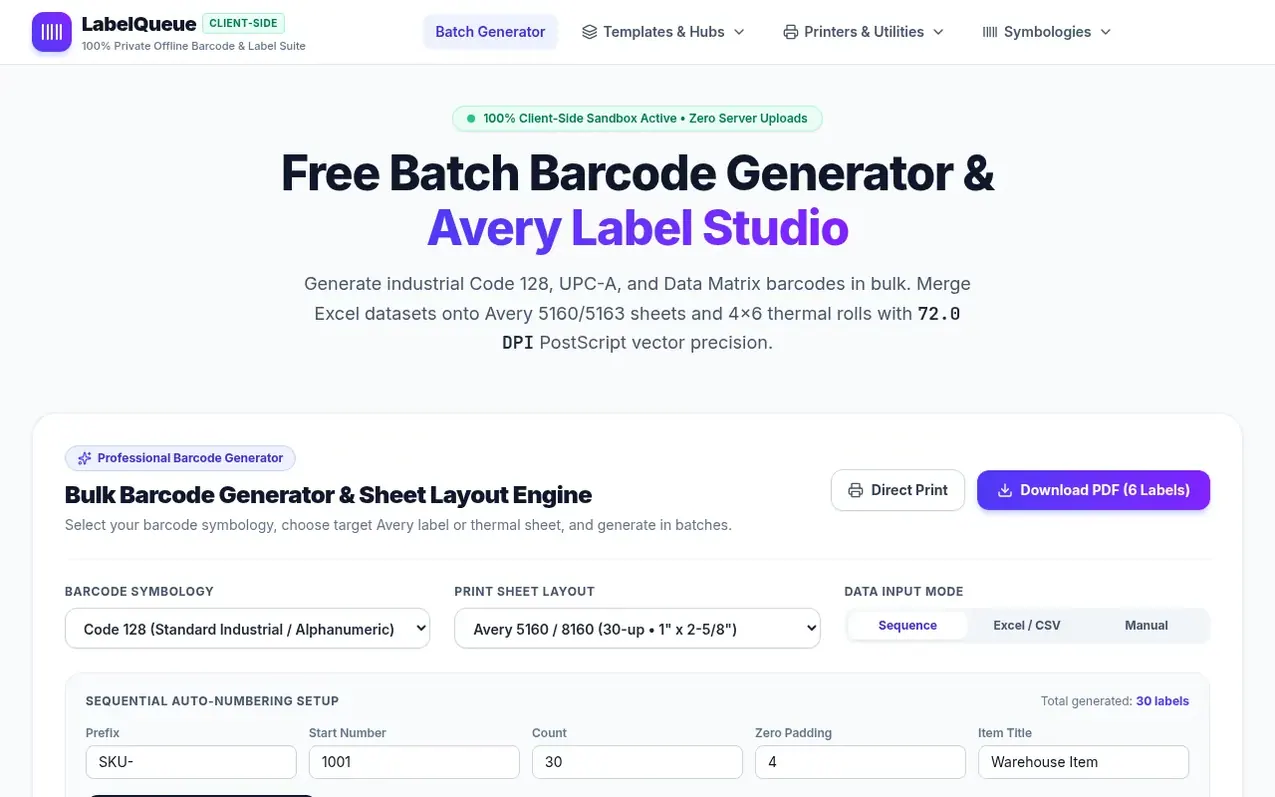
LabelQueue is a privacy-first barcode generation tool that runs entirely in your web browser. It generates bulk Code 128, UPC-A, and Data Matrix barcodes and merges them onto Avery label sheets (5160, 5163, 5164, 5167) and 4x6 thermal rolls with millimeter-accurate alignment.
The application operates on a 100% client-side architecture with zero server uploads. All spreadsheet parsing, barcode rendering, and PDF assembly execute locally inside your browser using WebAssembly and Web Workers, keeping your confidential inventory data completely private.
LabelQueue provides templates for multiple Avery label formats supporting gang printing, a native sequence generator for creating sequential barcodes, and support for multiple barcode symbologies. It includes detailed specifications for Avery 5160/8160 address labels, 5163/8163 shipping labels, and other standard label types with exact PostScript vector precision.
What it does
- Support for Code 128, UPC-A, EAN-13, Code 39, ITF-14, and Data Matrix barcode symbologies
- Avery template support including 5160, 5163, 5164, 5167, and 22806 label formats
- Native sequence generator for creating sequential barcodes without Excel
- 72.0 DPI PostScript vector PDF generation for exact alignment
- Excel and CSV spreadsheet import with automatic zero-padding
- Support for 4x6 thermal printer labels
- 4x6 Thermal Label designer for Rolo and Munbyn printers
- ZPL to PDF viewer and BarTender web alternative
Pricing
Pricing model: Free
Shopper questions
How do I generate sequential barcode numbers in bulk without Excel?
LabelQueue provides a native sequence generator in the tool panel. Select the Sequence tab, set your alphanumeric prefix (e.g., SKU- or SN-), starting integer, count, and zero-padding digits. Click Generate to instantly populate serialized barcodes with vector precision.
Why do my printed barcodes scan slowly or fail to read entirely?
Poor barcode readability is typically caused by insufficient Quiet Zones (margins on either side of the barcode), thermal or inkjet dot gain bleeding into narrow bar spaces, or scaling distortions from printing with Fit to Page instead of Actual Size (100%).
Does LabelQueue upload my confidential customer or inventory spreadsheets?
No. LabelQueue operates on a 100% client-side zero-knowledge architecture. All spreadsheet ingestion, barcode graphic rendering, and PDF assembly are executed locally inside your web browser using WebAssembly and Web Workers. No data is transmitted to a server.
Which Avery label templates are supported for gang printing?
LabelQueue supports Avery 5160/8160 (30-up address labels, 1" x 2-5/8"), Avery 5163/8163 (10-up shipping labels, 2" x 4"), Avery 5164/8164 (6-up cargo labels, 3-1/3" x 4"), Avery 5167/8167 (80-up return address labels, 1/2" x 1-3/4"), and standard 4" x 6" direct thermal continuous rolls.
How can I ensure my barcode PDF prints with exact alignment on Avery sheets?
Always set your printer driver scale to Actual Size (100%). Verify that paper size is set to US Letter (8.5" x 11") and margins are set to None or Default. Download a free blank test sheet first to verify mechanical paper tray feeding before printing on expensive adhesive label sheets.
LabelQueue has a free listing. The owner can unlock the full profile with a paid launch for $5:
- Founder story (locked)
- Milestones (locked)
- Demo video (locked)
- Dofollow website link (locked)
Shoppers also viewed
- Iconaut
Design tools
- Voilà Charts
Design tools
- MockShot Studio
Design tools
- BannerSplitter
Design tools