Chobial
Shoot Now. Edit Later.
A film camera app and photo editor for iPhone, iPad and Android that lets you see film looks live in the viewfinder and edit them later.
About this launch
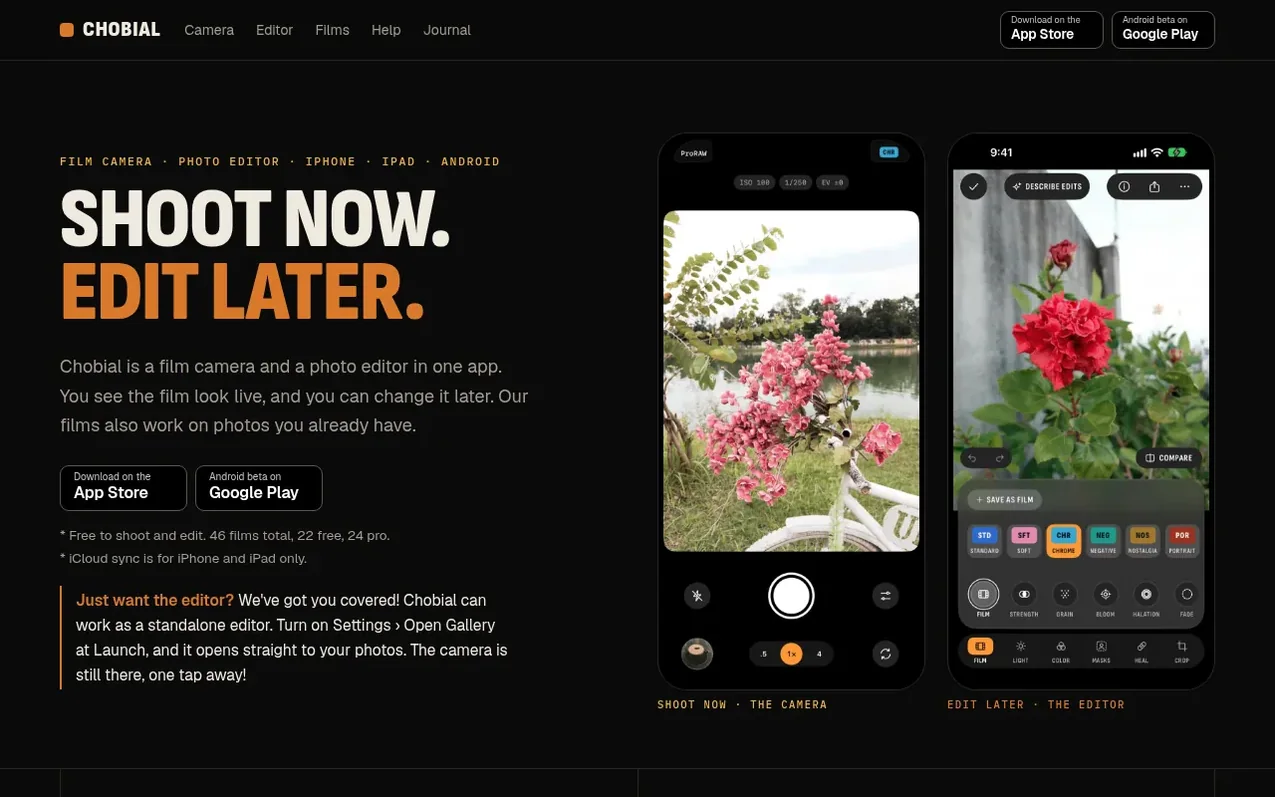
Chobial is a film camera and photo editor in one app for iPhone, iPad and Android. You see the film look live in the viewfinder before you press the shutter, and you can swipe to change it. The app shoots RAW by default and keeps every original photo, so you can develop the same photo again in another film at any time.
The editor works with photos from your phone or other cameras, including RAW files from Fujifilm, Sony, Nikon and others. Chobial has 46 built-in films: 35 in colour and 11 in black and white. You can make your own film from scratch, from a built-in film, from a .cube LUT or from a Lightroom preset, and share it as a QR code.
The editor includes masks, heal, clone, and Describe Edits, which turns sentences like "warmer, darker sky" into slider values using a language model on the device. Shooting, developing and basic editing are free. Pro adds the ability to save in all 46 films, save photos with advanced edits, and batch export.
What it does
- 46 built-in films (35 colour, 11 black and white)
- Live film preview in viewfinder
- Shoot RAW, ProRAW, HEIF or JPEG
- Manual ISO and shutter controls
- Histogram and zebras
- Manual focus with peaking
- Masks for subject, sky, background and people
- Heal and clone tools
- Describe Edits AI feature
- Create and share custom films as QR codes
Pricing
Pricing model: Freemium
Free: shoot with any of 46 films, edit with Film, Light, Color, Crop and Describe Edits, save photos in 22 free films, import photos from other cameras. Pro: $29.99 once or $14.99 per year (first week free); save in all 46 films, use masks/heal/clone, export RAW (DNG), batch save, export as .cube LU
Shopper questions
How is Chobial different from Apple Photographic Styles?
Apple's Styles don't work when you shoot RAW, and you can change a style later only on HEIF photos. Chobial's films work on RAW, HEIF and JPEG, and you can change the film on any of them later because the original is kept.
Does Chobial use AI?
Yes, in two places: masks and Describe Edits. Masks use AI on the device only to find where an edit goes. Describe Edits is optional and uses a language model on the device to turn descriptions like "warmer, darker sky" into slider values. No generative AI adds or removes anything in your photos.
Does Chobial sync photos and settings?
Yes, on iPhone and iPad. Films, settings and photos sync through iCloud and count toward your iCloud plan. You can turn sync off in Settings. Android is still in beta and doesn't sync yet, but it is planned in the roadmap.
Can Chobial work as just a photo editor?
Yes. Import photos from Photos, Files or your camera, and edit them without opening the camera. Turn on Settings › Open Gallery at Launch, and Chobial opens on your photos instead of the camera viewfinder.
Can I edit photos from my Fujifilm or Sony camera?
Yes. Chobial reads RAW files from most cameras, such as Fujifilm RAF and Sony ARW. Connect the camera or a card reader with a cable, then tap Import Photos › Cameras and Cards.
Chobial has a free listing. The owner can unlock the full profile with a paid launch for $5:
- Founder story (locked)
- Milestones (locked)
- Demo video (locked)
- Dofollow website link (locked)
Shoppers also viewed
- ShowPara Passport Photo
Photography & video
- ChronoFrame
Photography & video
- Love is Magic Photography
Photography & video
- FRGMT
Photography & video