Batch for Google Photos
Bulk edit Google Photos in Chrome with enhance, filter, crop, rotate, caption, delete, and download features
A Chrome extension that automates Google Photos editing across hundreds of photos at once, allowing users to enhance, filter, crop, caption, and delete in bulk
About this launch
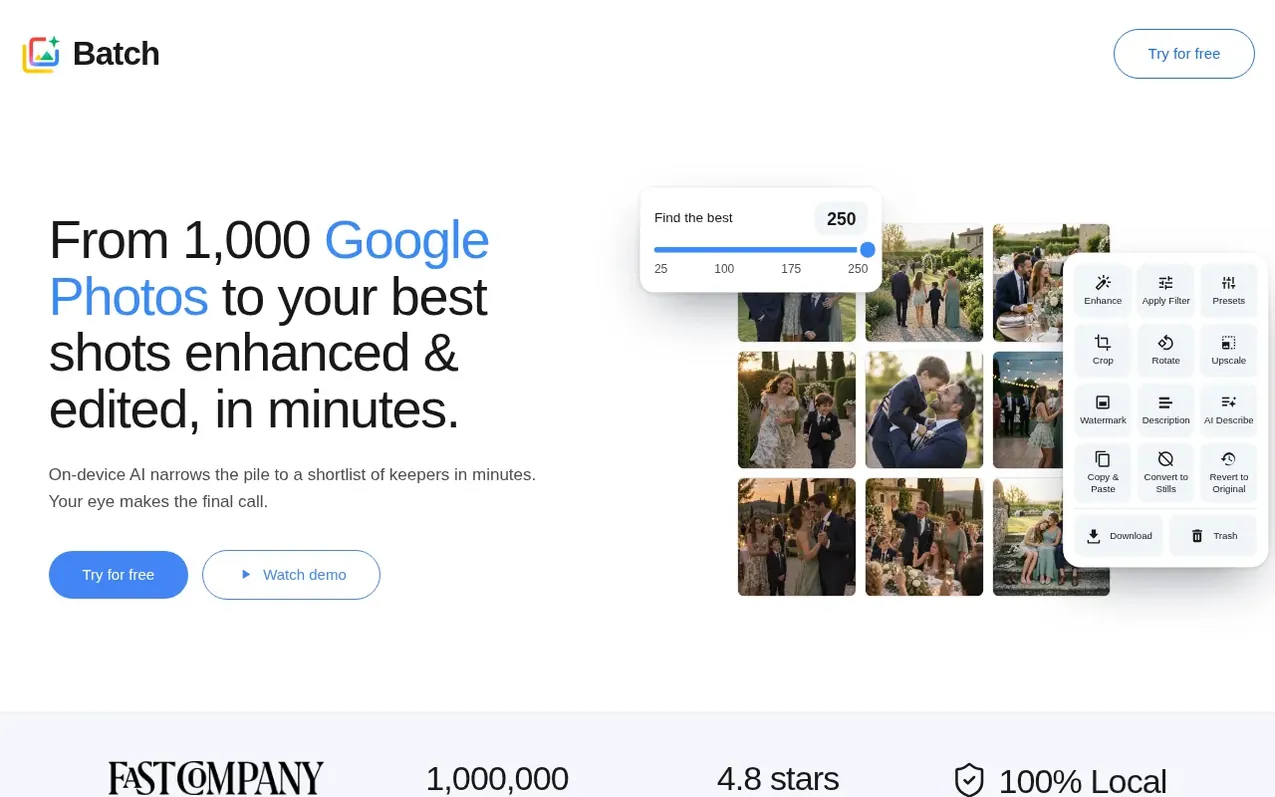
Batch for Google Photos is a Chrome extension that closes a feature gap in Google Photos by enabling bulk editing. Users select photos and click Batch to choose an action, then the extension automates Google Photos' editor across the full selection.
The extension offers AI-powered photo selection to find your best shots, with tools to enhance, apply filters, crop, rotate, add descriptions, and apply custom presets across entire albums at once. Advanced features include converting live photos to stills, downscaling photos to free storage, watermarking, and bulk downloading or deletion of entire libraries.
All edits run inside Google Photos using its native tools. Photos never leave Google's servers or your device, and Batch has no backend server processing photo content. The extension works on Chrome desktop across Windows, macOS, Linux, and ChromeOS.
What it does
- Auto-enhance photos in bulk
- Apply filters consistently across batches
- Crop to multiple aspect ratios including square, 9:16, and 3:2
- Rotate or flip photos in bulk
- Add searchable descriptions across entire batches
- Save and apply custom presets
- Convert live photos to stills in bulk
- Download entire Google Photos library in full quality
- Move entire library to trash in one action
- AI-powered photo selection to find best shots
Pricing
Pricing model: Freemium
Free: 25 photos per month. Plus Monthly: $6.99 USD for 500 photos per month. Plus Annual: $55 USD for 500 photos per month, billed annually. Pro Monthly: $24.99 USD for unlimited photos plus bulk revert. Pro Annual: $199 USD for unlimited photos plus bulk revert, billed annually.
Shopper questions
Can you bulk edit photos in Google Photos?
Not with the built-in editor—Google Photos edits one photo at a time. Batch is a Chrome extension that adds bulk editing on top of Google Photos: select hundreds of photos, then auto-enhance, filter, crop, rotate, caption, revert, or apply a Custom Preset to them in one click. The edits run inside your open Google Photos tab, so nothing is uploaded to Batch.
Can I save my own edit settings as a preset?
Yes. Fine-tune one photo in Google Photos for brightness, warmth, shadows, saturation, vignette, and more, then save those settings as a Custom Preset. Batch then applies the same look across every photo in your selection. Custom Presets are included on every plan.
Does Batch upload my photos?
No. Every edit happens inside Google Photos using the same tools you use manually, and Batch just automates the clicks. Your photos never leave your browser, and Batch doesn't run a server that processes or stores any photo content. The only changes Batch makes are the specific edits you chose on the photos you selected.
Why did Batch only edit some of the photos I selected?
Batch automatically skips photos it can't edit: videos, photos shared with you that you don't own, and photos beyond your monthly quota or per-batch cap for your plan. You'll see a breakdown of processed and skipped photos at the end of each run, and skipped photos are never modified.
Can I close the tab or step away while a batch runs?
You can switch tabs, use other apps, or lock your screen, and Batch keeps running. Don't close the Google Photos tab during a batch, since closing it stops the run.
Batch for Google Photos has a free listing. The owner can unlock the full profile with a paid launch for $5:
- Founder story (locked)
- Milestones (locked)
- Demo video (locked)
- Dofollow website link (locked)
Shoppers also viewed
- HennaTrace
Photography & video
- Photomyne
Photography & video
- PolaFilm
Photography & video
- Evoto
Photography & video